MōBrowser 2.20.1
In this update, windows on Windows keep their buttons when the title bar is hidden, Microsoft Store packages register custom schemes, and the main process can react to the system waking up from sleep. MōBrowser is now based on Chromium 157.
What’s new
Window buttons with a hidden title bar on Windows
When you hide the title bar of a window on Windows, the minimize, maximize, and close buttons now stay visible. They are drawn over the top-right corner of the window content, so the application can render its own toolbar there and keep the native buttons, as on macOS:
import { BrowserWindow } from '@mobrowser/api';

const win = new BrowserWindow({
  windowTitlebarVisible: false
})
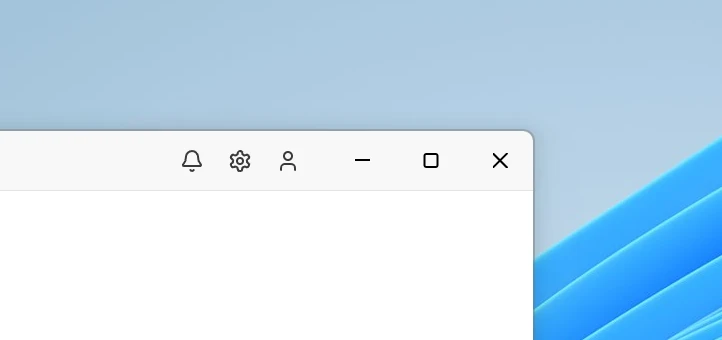
The buttons follow the app theme and are hidden in fullscreen mode. Hovering the maximize button shows the Windows 11 snap layouts. The buttons have no background, so keep the page scrollbar and interactive elements out from under them. To hide them, use setWindowButtonVisible() or the windowButtonVisible option.
By default, the buttons are as tall as the native title bar. To make them as tall as the toolbar of the application, set their height in DIPs with setWindowButtonHeight() or the windowButtonHeight option:
const win = new BrowserWindow({
  windowTitlebarVisible: false,
  windowButtonHeight: 40
})
The buttons keep their standard width and the same height when the window is maximized. Pass null to setWindowButtonHeight() to restore the standard height.
Custom schemes in Microsoft Store packages
npm run pack -- --msix now declares the custom schemes from app.schemes in the MSIX package. Windows registers them when the application is installed from the Microsoft Store and removes them when it’s uninstalled. Links with these schemes start the application, and app.handle('openUrl') receives them as in an application installed with Setup.exe.
pack --msix skips, with a warning, a scheme that a package can’t declare: one shorter than 2 or longer than 39 characters, or one that Windows reserves.
System resume event
The app now emits systemResumed when the system resumes from sleep. Use it to refresh data that may be stale, reconnect to a server, or run work that was due while the computer was asleep:
import { app } from '@mobrowser/api';

app.on('systemResumed', () => {
  checkForUpdates()
})
On Linux, the event requires systemd-logind. On Windows, it can be emitted more than once during one sleep.
Read more about the system resume eventWall clock timers
The new wallClock API runs main-process timers by the system clock. Unlike the global setTimeout() and setInterval(), a wallClock timer whose deadline passes while the system is asleep fires right after it resumes. The global timers count elapsed time, which on Linux doesn’t include sleep, so a long timer fires late by the length of the sleep. They also can’t wait longer than about 24.8 days, while wallClock timers accept delays of up to one year.
Run a callback after a delay or at a specific moment:
import { wallClock } from '@mobrowser/api';

const HOUR = 60 * 60 * 1000

wallClock.setTimeout(() => {
  console.log('Two hours have passed')
}, 2 * HOUR)

const reminder = wallClock.setTimeout(() => {
  console.log('Time is over')
}, new Date('2026-12-01T09:00:00'))
Run a callback periodically. If the timer missed ticks, for example during sleep, the callback runs once and reports how many it missed:
wallClock.setInterval(({ missed }) => {
  if (missed > 0) {
    console.log(`Missed ${missed} backups while asleep, running one now`)
  }
  runBackup()
}, 6 * HOUR)
A timer reports whether it’s running and when it fires next, and can be stopped:
console.log(reminder.isRunning())  // true
console.log(reminder.nextRunTime)  // December 1, 2026, 09:00 local time

reminder.stop()
A wallClock timer doesn’t keep the application running, and all timers are cleared on shutdown.
Stack updates
- Updated Chromium to version 157.0.8103.39.
- Updated Node.js to version 24.22.1.
Fixes and improvements
- Fixed the window buttons on Windows keeping the colors of the previous theme after the app theme changed at runtime, until the window lost and regained focus.
- Fixed an empty strip at the top of a maximized window with a hidden title bar on Windows. The strip also pushed the window buttons below the top edge of the screen, so a click in the top-right corner of the screen missed the close button.
setWindowButtonVisible('minimize', false)andsetWindowButtonVisible('maximize', false)on Windows now only hide the button. Previously, they also stopped the window from being minimized from the taskbar, maximized by double-clicking a draggable region, or snapped with Win+arrow keys. To stop a window from being maximized, usesetResizable(false).- Fixed main-process timers on macOS that came due while the system was asleep. They waited for an unrelated event, and now fire right after the system resumes.
- AI coding agents now write the
README.mdof an application they build in a project created withcreate-mobrowser-app. The newproject-readmeskill makes writing the README the last step of building the app and tells the agent where each fact comes from: the app name and description, requirements, how to run and build the app, and where to download it when the project has a release workflow. The agent extends an existing README instead of replacing it.