Context Menu
This page describes how to create and show a context menu in the application window.
Overview
By default, there’s no context menu (aka. the right-click menu) in the application window. But you can create and show a native context menu that contains both the standard and custom context menu items.
Creating a context menu
When a user right-clicks on the application window, the Browser::onShowContextMenu delegate is called. In this
delegate you can create a context menu with the necessary items and show it:
browser->onShowContextMenu = [](const ShowContextMenuArgs& args,
                                ShowContextMenuAction action) {
  auto context_menu = context_menu::Menu({
      // Add context menu items here.
  });
  action.show(context_menu);
};
The ShowContextMenuArgs structure contains the information about the element that was right-clicked on. User can
right-click on a link, image, text, video, audio, etc. You can use this information to create and show the different
context menus for different elements as shown in the following example:
browser->onShowContextMenu = [](const ShowContextMenuArgs& args,
                                ShowContextMenuAction action) {
  ContextMenuItems items;

  // Add menu items for a page.
  if (args.content_type.is_page) {
    items.push_back(context_menu::GoBack());
    items.push_back(context_menu::GoForward());
    items.push_back(context_menu::Reload());
    items.push_back(context_menu::Separator());
    items.push_back(context_menu::SavePageAs());
    items.push_back(context_menu::Print());
    items.push_back(context_menu::Separator());
  }

  // Add menu items for a link.
  if (args.content_type.is_link) {
    items.push_back(context_menu::SaveLinkAs());
    items.push_back(context_menu::CopyLinkAddress());
    items.push_back(context_menu::Separator());
  }

  // Add menu items for an image.
  if (args.content_type.is_image) {
    items.push_back(context_menu::SaveImageAs());
    items.push_back(context_menu::CopyImageAddress());
    items.push_back(context_menu::CopyImage());
    items.push_back(context_menu::Separator());
  }

  // Always add the following menu items.
  items.push_back(context_menu::InspectElement());

  // Show the context menu.
  action.show(context_menu::Menu(items));
};
Standard context menu items
Here’s a list of the helper functions you can use to create the standard context menu items:
| Helper function | Description |
|---|---|
context_menu::Separator() | Creates a menu separator. |
context_menu::GoBack() | Creates the Back menu item. |
context_menu::GoForward() | Creates the Forward menu item. |
context_menu::Reload() | Creates the Reload menu item. |
context_menu::SavePageAs() | Creates the Save Page As… menu item. |
context_menu::Print() | Creates the Print… menu item. |
context_menu::ExitFullScreen() | Creates the Exit Fullscreen menu item. |
context_menu::SaveLinkAs() | Creates the Save Link As… menu item. |
context_menu::CopyLinkAddress() | Creates the Copy Link Address menu item. |
context_menu::CopyEmailAddress() | Creates the Copy Email Address menu item. |
context_menu::SaveImageAs() | Creates the Save Image As… menu item. |
context_menu::CopyImageAddress() | Creates the Copy Image Address menu item. |
context_menu::CopyImage() | Creates the Copy Image menu item. |
context_menu::SaveAudioAs() | Creates the Save Audio As… menu item. |
context_menu::CopyAudioLocation() | Creates the Copy Audio Location menu item. |
context_menu::SaveVideoAs() | Creates the Save Video As… menu item. |
context_menu::CopyVideoLocation() | Creates the Copy Video Location menu item. |
context_menu::PictureInPicture() | Creates the Picture in Picture menu item. |
context_menu::Loop() | Creates the Loop menu item. |
context_menu::Controls() | Creates the Controls menu item. |
context_menu::RotateCW() | Creates the RotateCW menu item. |
context_menu::RotateCCW() | Creates the RotateCCW menu item. |
context_menu::ReloadFrame() | Creates the Reload Frame menu item. |
context_menu::ViewFrameSource() | Creates the View Frame Source menu item. |
context_menu::Undo() | Creates the Undo menu item. |
context_menu::Redo() | Creates the Redo menu item. |
context_menu::Cut() | Creates the Cut menu item. |
context_menu::Copy() | Creates the Copy menu item. |
context_menu::Paste() | Creates the Paste menu item. |
context_menu::PasteAndMatchStyle() | Creates the Paste and Match Style menu item. |
context_menu::SelectAll() | Creates the Select All menu item. |
Custom context menu items
You can create and add a custom menu and the custom menu items to the context menu. Here’s an example of how to do it:
browser->onShowContextMenu = [](const ShowContextMenuArgs& args,
                                ShowContextMenuAction action) {
  ContextMenuItems custom_menu_items;
  custom_menu_items.push_back(context_menu::Item(
      "Custom Menu Item 1",
      [](const CustomContextMenuItemActionArgs& args) {
        args.browser->executeJavaScript("alert('Hello from menu item 1!')");
      }));
  custom_menu_items.push_back(context_menu::Item(
      "Custom Menu Item 2",
      [](const CustomContextMenuItemActionArgs& args) {
        args.browser->executeJavaScript("alert('Hello from menu item 2!')");
      }));
  auto custom_menu = context_menu::Menu("Custom Menu", custom_menu_items);

  ContextMenuItems items;
  items.push_back(custom_menu);
  items.push_back(context_menu::Separator());
  items.push_back(context_menu::InspectElement());

  action.show(context_menu::Menu(items));
};
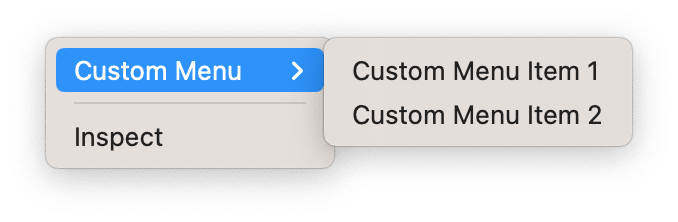
You will see the following context menu when you right-click on the application window: