Architecture
A high-level overview of the MōBrowser architecture, its process model, native C++ module, and inter-process communication.
MōBrowser is a framework for building native cross-platform desktop applications using web technologies. If you are a web developer, then you can create native desktop apps for Windows, macOS, and Linux with the stack and tools they already know. No need to learn native platform frameworks or additional programming languages.
Overview
MōBrowser combines two key technologies into a single desktop application:
- Chromium — the most advanced browser engine that renders your application’s user interface and supports the latest web standards.
- Node.js — a JavaScript runtime that gives your application full access to the file system, networking, operating system APIs, and more.
Instead of deploying your code to a web server and opening it in a browser, MōBrowser packages it with its own Chromium-based runtime. Your application runs as a standalone desktop program. The program includes native OS integration for creating and manaing windows, menus, system tray, file dialogs, clipboard, global shortcuts, and more.
Process model
The framework inherits Chromium’s multi-process architecture. The following diagram shows the high-level architecture of a MōBrowser application:
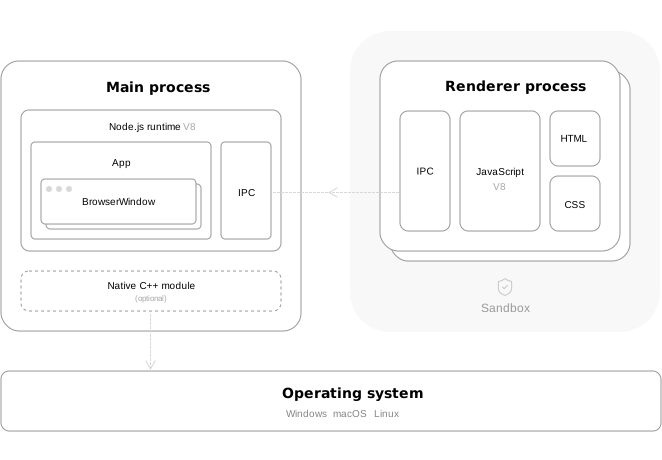
Your application consists of several separate operating system processes:
- Main process. The main process where Node.js is running and your application (backend) business logic is executed.
- Renderer process. The isolated process responsible for rendering web content (frontend) inside a browser window.
When your application starts, MōBrowser launches the main process. When you create a new browser window, the framework launches a separate renderer process that loads a web content. The web content is displayed inside the browser window.
When browser window is closed, the corresponding renderer process terminates and releases all allocated memory.
The main process continues running until:
- the application is terminated programmatically by calling
app.quit() - the user closes all windows (Windows and Linux only)
- the user terminates the application manually
Main process
Think of the main process as your backend server: it manages the application, handles business logic, and provides access to system resources.
The main process is the entry point of your application. It is responsible for:
- Managing the application lifecycle.
- Creating and controlling application windows, dialogs, system tray, menus, etc.
- Accessing native operating system APIs such as file system, clipboard, global shortcuts, and more.
- Communicating with renderer processes via IPC.
- Loading and calling a native C++ module.
Renderer process
Each application browser window loads a web content in a separate renderer process. In this process JavaScript, HTML, and CSS of the loaded web content is running.
Each renderer process runs in a sandbox that restricts access to file system, network, and other system resources. When JavaScript code in the renderer process needs to perform a privileged operation, it must send a message to the main process via IPC.
The renderer process isolation is a security feature that helps protect your application from malicious code. Even if malicious code runs in your renderer process (for example, from third-party content or a compromised dependency), it cannot access sensitive system APIs or user data without going through the main process.
Read more about the renderer processInter-Process Communication
IPC (Inter-Process Communication) is the bridge between your sandboxed renderer process and the privileged main process. Use IPC to send messages, transfer data, and call functions across the process boundary.
Read more about IPCNative C++ module
For scenarios that require maximum performance or access to platform-specific APIs not available through Node.js, MōBrowser supports an optional native C++ module. The native module runs alongside the main process and can be called from your TypeScript code.
This is entirely optional. Most applications do not need a native module. TypeScript and the built-in APIs cover the vast majority of use cases.
Read more about the native C++ moduleA familiar model for web developers
If you come from web development, MōBrowser’s architecture maps directly to concepts you already know:
| Web development | MōBrowser |
|---|---|
| Backend (Node.js, Express) | Main process |
| Frontend (React, Vue, etc.) | Renderer process |
| HTTP requests, WebSockets | Inter-Process Communication |
Think of the main process as your backend: it manages the application, handles business logic, and provides access to system resources. Each renderer process is like a browser window/tab: it renders your frontend and communicates with the “backend” when it needs something outside the browser sandbox.
The key difference from regular web development is that both the frontend and the backend run locally on the user’s machine, bundled together in a single application.
There is no network latency between them, no remote server to manage, and no deployment pipeline. Just a native desktop app that your users download, install, and run.